
Introduction
Did you see a trash can that opens automatically whenever you approach it? It’s called a Smart Dustbin Using Arduino. It uses special sensors, which means you don’t need to handle the dustbin by hand. It keeps the area clean and safe.
In this Techradiance tutorial, you’ll learn about what a smart bin is, why it’s required, and how it works. Additionally, you will find the parts list of the circuit, as well as the code, and all the procedures to build your own smart dustbin. This explanation has been written in extremely easy language so that even students in 5th grade are able to comprehend the concept.
Author: Rahul, a Robotics Expert
What Is a Smart Dustbin?
A Smart Dustbin Using Arduino is a unique dustbin that opens its lid by itself. It doesn’t require you to use your hands.
It’s as simple as this:
- It is equipped with its own ultrasonic detector that detects the moment your body or hand gets close to the bin.
- When the sensor spots that someone is nearby, it sends a signal that is sent to the Arduino (a tiny computer).
- The Arduino sends an instruction to a motor servo to raise the lid on its own.
This kind of project is known as the Smart Dustbin Project. It is a huge hit with students in schools and engineering students, as well as in science competitions, due to it being simple in construction and its benefits in keeping our environment free of germs and clean.
Why Do We Need a Smart Dustbin?
We need smart dustbins because:
- It helps keep our hands hygienic.
- It can help prevent infection and germs.
- It makes the process of disposing of waste modern and enjoyable.
- It’s extremely useful in hospitals, schools, office buildings, homes, and homes.
- It helps save time and also makes hygiene automatic.
This is the reason why the Automatic Dustbin project is among the most beneficial technological projects for novices.
How Does a Smart Dustbin Work?
The operation of a smart bin is quite easy:
- This ultrasonic sensor examines whether something is close to the garbage bin.
- When your hand gets close to the sensor, it detects the distance.
- The Arduino gets signals from sensors.
- Arduino transmits a signal to the motor’s servo.
- The servo motor spins and lifts the lid.
- After a couple of seconds, the motor closes the lid.
This is how automated opening and closing happen in a smart garbage bin.
You don’t need to handle anything.
Key Components Required for a Smart Dustbin Using Arduino
To complete this project, it is necessary to have a few basic components. They are readily available in any electronic shop or on the internet.
1. Arduino Uno
It is the brain that runs the whole project. It is the one that controls everything.
2. Ultrasonic Sensor (HC-SR04)
The dustbin’s sensor can detect your hand or any other item.
3. Servo Motor
The motor helps shut and open the lid.
4. Jumper Wires
The wires are used to connect the various components to the Arduino.
5. Breadboard
It is used to make smooth and tidy connections, without soldering.
6. Dustbin
Any plastic dust bin of any size can be used.
7. 9V Battery /US Power
To supply power to the Arduino.
These components make it possible to create an entirely functional Smart Dustbin using Arduino.
Circuit Diagram Explanation
The circuit in this project is extremely simple.
- The ultrasonic sensor is equipped with four pins: VCC, GND, and TRIG.
- VCC 5V on Arduino 5V on Arduino
- GND + GND on Arduino
- TRIG 9 – Digital pin
- ECHO Digital pin 10
- The servo motor has three wires:
- VCC 5V
- GND – GND
- Signal Digital pin 6
After these connections are made and the hardware is connected, it’s almost done.
Smart Dustbin Code (Easy to Understand)
Below is the simplest Smart Dustbin Code that Arduino IDE uses:
| #include <Servo.h> Servo servo; int trigPin = 9; int echoPin = 10; long duration; int distance; void setup() { servo.attach(6); pinMode(trigPin, OUTPUT); pinMode(echoPin, INPUT); servo.write(0); } void loop() { digitalWrite(trigPin, LOW); delayMicroseconds(2); digitalWrite(trigPin, HIGH); delayMicroseconds(10); digitalWrite(trigPin, LOW); duration = pulseIn(echoPin, HIGH); distance = duration * 0.034 / 2; if (distance < 20) { servo.write(90); delay(3000); servo.write(0); } } |
This Smart Dustbin Code assists the servo to open the lid when someone walks close to it.
Step-by-Step Guide: How to Make a Smart Dustbin
Here’s the most straightforward method for how to make a smart dustbin using Arduino:
Step 1. Collect all the components
Be sure to keep all the components, like the Arduino ultrasonic sensor wires and the servo motor, in good order.
Step 2: Get the Dustbin
The lid of the dustbin should be opened to determine the best place to attach the motor servo.
Keep it in a position where it is able to turn the lid.
Step 3. Repair the Servo Motor
Make use of double-sided tape or hot glue to fix the servo to the inside of the lid.
Step 4. Connect an Ultrasonic Sensor
The ultrasonic sensor should be placed on top of the bin in the direction of the outside so that it can sense your hand.
Step 5: Connect Connections to the Circuit Connections
Connect all components using jumper wires exactly as described on the circuit diagram.
Step 6: Transfer the Smart Dustbin Code
Start the Arduino IDE and copy the code. Click Arduino Uno, select COM port – click Upload
Step 7: Test the Dustbin
Place your hands near your ultrasonic device.
If the lid opens in a sequence, then your smart dustbin project is complete!
Circuit Diagram: Connecting Arduino With Ultrasonic Sensor & Servo Motor
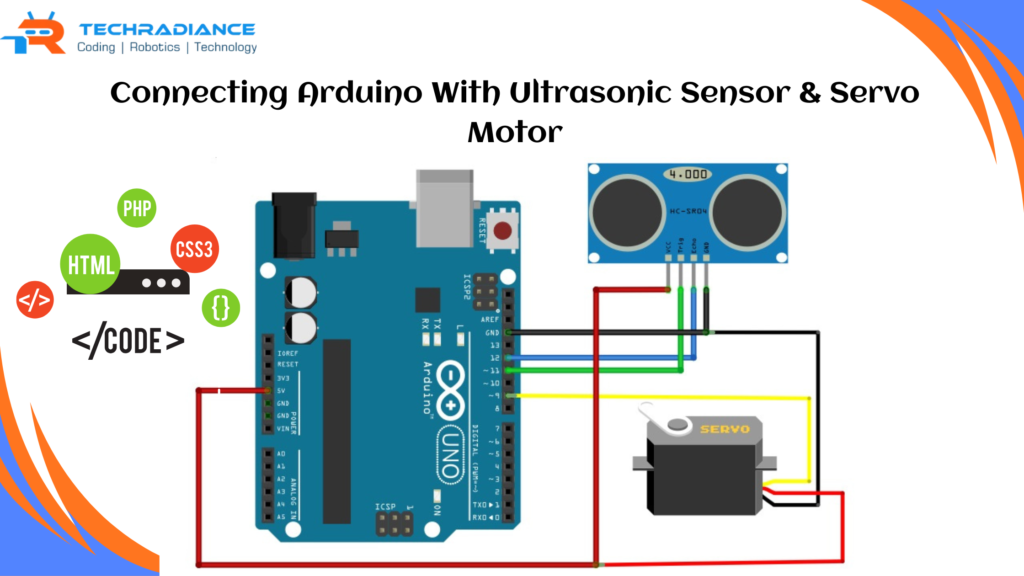
Imagine the circuit as a simple diagram that shows how the components interact with each each.
To enable the smart dustbin to function, we join the Arduino and the ultrasonic sensor, as well as the servo motor, by using wires:
- Its ultrasonic sensor is similar to your dustbin’s “eyes.” This sensor can detect if a hand is close to the dustbin.
- The motor servo is akin to the dustbin’s “hand.”
It can open and close the lid.
The way they link:
- The ultrasonic sensor is connected to the Arduino to transmit distance signals.
When your hand gets close to the Arduino, it informs the Arduino, “Hey! Someone is in the room! “ - The servo motor communicates with the Arduino to enable it to move whenever the Arduino sends a signal.
When the Arduino receives a message from the sensor, it informs the motor to “Open the lid of the dustbin! “ - The Arduino supplies energy to the sensor as well as the motor to ensure they function effectively.
The circuit is a simple wire connection that helps all the components communicate and also opens the dustbin on time.
Benefits of a Smart Dustbin Using Arduino
1. You don’t need to be touching the dustbin
Reduces the risk of contracting infections.
2. Best for Hygiene
Ideal for schools and hospitals as well as offices and homes.
3. Saves Time
It opens instantly and without effort.
4. Design is modern and smart
It makes your space appear clean and modern.
5. Great School & College Project
Students are taught Arduino sensors, as well as automation.
These advantages help make the Automatic Dustbin Project extremely popular all over the world.
Common Errors & Troubleshooting Guide for Smart Dustbin Using Arduino
Sometimes, your Smart Dustbin Using Arduino might not function in the way you would like it to. Don’t worry! Many problems are quite simple and can be solved quickly. Here are some of the most common errors and the best way to fix these issues:
1. The lid isn’t opening or closing
- The servo motor might not be connected correctly.
- Recheck the wires, and ensure that they’re on the right pins.
- Also, make sure that you can verify that the motor in your servo is receiving energy.
2. Ultrasonic sensor isn’t detecting anything
- The sensor could be blocked or dirty.
- Clean the sensor with the help of a cloth.
- Check that the sensor is facing in the correct direction.
3. The dustbin is open even if there is no one in the vicinity
- The sensor could have been too close to an object.
- Place the trash bin in an open space.
- Reduce the distance in the code, if necessary.
4. Arduino isn’t uploading the code
- The USB cable could be loose.
- Select the appropriate board and port within Arduino’s Arduino software.
- Try to restart the Arduino IDE.
5. The Servo motor is shaking or making a noise
- This is usually the case in situations where the supply of power is not strong enough.
- Make sure you have a high-quality battery or power source.
- Verify that your grounded (GND) conductor is connected correctly.
Real-Life Applications
- Homes
- Offices
- Hospitals
- Public spaces
- Airports and malls
Where hygiene is a concern, this project will be of great use.
Safety Tips While Building the Project
Be sure to ensure that you keep Arduino out of the water.
Do not pull wires using force.
Only use low-voltage (5V).
Be cautious not to get in the way of the motor’s servo movement.
Slowly and cautiously adhere to the instructions.
Why This Project Is Best for Students
The Smart Dustbin project will teach students:
- Basic electronic
- Sensors
- Coding
- Robotics
- Real-life automation
It’s easy, safe, and is a fantastic opportunity to get a practical understanding of technology. This is why a lot of students in Techradiance workshops can build this project with confidence.
What Students & Learners Say About Techradiance
1. “This was the most enjoyable project I’ve ever created!”
“Techradiance made it so simple. I constructed my smart dustbin in a single day, and it was working flawlessly. The instructors explained every step clearly so that I was able to complete the task without assistance. “
— Aarav Singh, Class 7
2. “I finally got Arduino due to Techradiance.”
“I always believed that Arduino was a challenge. However, after this project, I am quite confident. The smart dustbin built with Arduino was a blast, simple, and very enjoyable to construct.
— Riya Sharma, School Student
3. “My schoolteachers were extremely pleased!”
“I demonstrated my auto-dustbin project in class, and everyone was impressed. My teacher told me it was among the most impressive work projects from the past year. I am grateful to you, Techradiance, for guiding me through this project so well!
– Krish Patel, Class 8.
4. “Super simple instructions and excellent assistance .”
“The steps were clearly laid out, and the list of components was flawless. Even when I had a problem and needed help, the Techradiance team was quick to help me. I thoroughly enjoyed every minute of this endeavour.
– Mehak Verma Hobby Learner
5. “I learnt coding as well as sensors and robotics all in the same task!”
“The Smart Dustbin Project has simply taught me many things. I’m now looking to create further projects of my own. Techradiance is a great location for young tech enthusiasts! “
— Harsh Tiwari, Student
Final Thoughts:
Making a Smart Dustbin with Arduino is incredibly simple, enjoyable, fascinating, and beneficial. It will teach the basics of how machines function, how sensors can detect objects, and what automation can do to improve our lives. With just a few elements, a little coding, and a little imagination, you can create an interesting project either at home or in school.
A well-designed dustbin encourages cleanliness, minimises exposure to germs, and makes disposal more modern and effective. If you’re interested in learning more about exciting projects similar to this one, Techradiance offers hands-on education for all students.
Frequently Asked Questions
1. What is a smart dustbin using Arduino?
A smart dustbin using Arduino is a digital dustbin that opens its lid automatically whenever you approach it. It is powered by an ultrasonic sensor, as well as the moving servo motor.
2. How does an automatic dustbin project work?
It operates by detecting your hand with the ultrasonic sensors. Arduino determines the distance and then instructs a servo motor to close and open the lid on the dustbin.
3. What components are needed for a smart dustbin project?
You’ll require an Arduino Uno, an ultrasonic sensor, and servo motors, as well as jumper wires, a dustbin, and a source of power, such as a 9V battery or a USB cable.
4. How do I make a smart dustbin at home?
Connect the motor and sensor to an Arduino, put the components on an empty dustbin and upload the code, and then test the lid. The lid will open automatically whenever your hand is close to it.
5. Where can I use a smart dustbin?
You can utilise it in schools and homes as well as hospitals, offices, malls, and public areas where hygiene is important.